Simplifying receipt filing and approvals for corporate travel
UX Research0-to-1 Product Design
Summary
I led and designed the expense management system for Miraee, Mondee's AI-native corporate travel application. It lets corporate travellers submit and file their receipts quickly during travel, gives the finance team clear visibility into spend, and keeps approval times with managers short.
95% reduction in creation time — from ~90 minutes to under 4 with AI aggregation
80% reduction in manager review time through automated policy checks
Enterprise-ready compliance that passed onboarding requirements for JP Morgan and DCW
Eliminated submission anxiety with real-time compliance scoring and AI pre-checks
Context
Why is expense management a big problem in travel?
Corporate expense management is notoriously slow. Travellers lose hours compiling receipts; finance teams lose hours cross-checking them against policy; and both sides trade emails over minor justifications. Neither side is unreasonable: the traveller wants to go home, and finance wants numbers it can defend.
Miraee was already in the market, in its early phases, with two customers who were also our investors: TCW and JP Morgan. Their pain points were where we started, and the product had to satisfy the rigidity of one side and the speed the other expects.
The three stakeholders, and the old process they were stuck in.
Traveller
Manager
Finance
Traveller
1Compiles receipts
About 90 minutes a report, in the spreadsheet era
Traveller
2Submits the report
Sent off with the receipts attached
Manager
3Approves
Often without a close look
Finance
4Checks against policy
Line by line, by hand
Finance
5Rejects for something minor
Sent back over a small mismatch
Traveller
6Re-justifies over email
Then back to step 1. The loop this project removes
This is the current system, one prototype for each of the three stakeholders.
Home
9:41
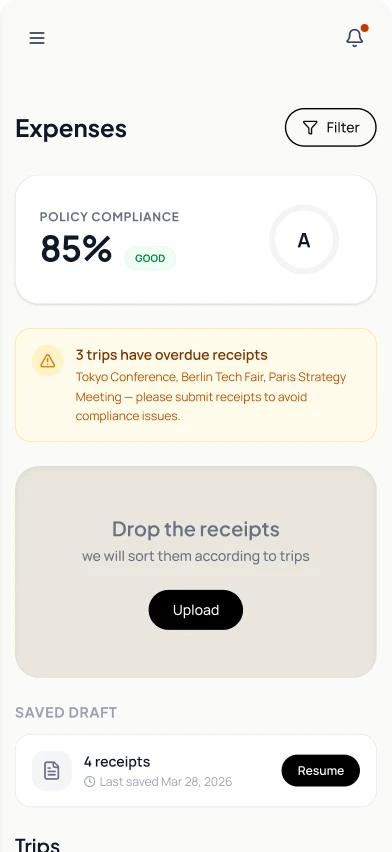
Expenses
Policy compliance
85%GOOD
A
3 trips have overdue receipts
Tokyo Conference, Berlin Tech Fair, Paris Strategy Meeting — please submit receipts to avoid compliance issues.
Drop the receipts
we will sort them according to trips
Saved draft
4 receipts
Last saved Mar 28, 2026
Trips
3receipts
New York Business Trip
Client meeting
ONGOING
2receipts
Singapore Sales Meeting
Client pitch
5 DAYS AGO
9receipts
London Product Launch
Product demo
15 DAYS AGO
25receipts
Tokyo Conference
Tech summit
35 DAYS AGO
12receipts
Berlin Tech Fair
Industry expo
68 DAYS AGO
The traveller opens Expenses.
A compliance score, a warning about overdue trips and a saved draft, all on one screen. Upload is the only way in.
Where the time goes
The Gantt follows one expense from capture to reimbursement. Filing the receipts takes about twelve minutes, yet it waits about two weeks, the longest wait on the chart. The durations are averaged from usage log timings, so they are approximate but based on real user data.
TravellerManagerFinanceWaitingWorking
The goal
Find out why travellers hold off on filing for so long, then make filing, review and finance checks faster for everyone involved.
Where we start
Metric
Spreadsheet era
Our v1 (the baseline)
Time to create a report
~90 min
~12 min
Time to review
19% of reports have errors
~15–20 min per report, all manual
Turnaround, submit to approved
—
~4–6 days, +1–2 days per rejection
Turnaround, trip end to approved
—
~3 weeks
Auto-approval
0%
0%
What the logs and interviews showed
We analysed upload logs and interviewed a cohort of business travellers. Two capture behaviours came out of it.
Capture as you go
Uploads each receipt individually, as they receive it.
Batch uploaders
Snaps photos throughout the trip, then uploads them all at once at the end of the day.
Whichever way they uploaded, both types hit the same wall at the sorting and verification stage.
The five-minute expectation, and the tab-by-tab reality
In the interviews, a clear pattern emerged: travellers expected expense filing to be a quick, five-minute admin task. They were not avoiding it because the backend was slow, since our OCR and matching were fast. They were avoiding it because the v1 interface made the task look exhausting.
The structural flaw
v1 was linear, tab by tab. To cross-check an amount, find a policy flag or make sure nothing was missing, a traveller had to open every receipt one by one. There was no macro view, so a five-minute mental task became a 150-click chore. The gap between “this should take five minutes” and “this screen will take me thirty” is why they put filing off for weeks.
Research & analysis
Where the old flow hurt, and why
Research strategy
Approach
Rapid heuristic evaluations, because we were iterating on a live product and had to move fast.
Who
Internal subject matter experts (SMEs) and industry veterans with decades in corporate travel, treated as the users.
What we did
Showed them the flow and watched how well they could navigate it, understand it and move ahead.
Checked against
Industry standards: Navan and Ramp.
Where it hurts, for each stakeholder
Mapped forTravellerManagerFinance
Capture
Sort & verify
Send
Manager review
Finance check
Reimbursed
Keeps receipts
Checks every receipt
Clears every issue
Waits
Waits
Gets paid
—
—
—
Waits, then reviews
—
—
—
—
—
—
Waits, then checks policy
Reimburses
Touch point
Receipts
Receipt tabs
Confirm All
Approvals list
Policy check
Notification
Traveller feels
Manager feels
Finance feels
Pain
Fear of losing one
12 min of re-checking
Locked, and unclear why
A queue, then fixes by email
Re-checks what was verified
Weeks after the trip
Needs
Capture is the whole job
Trust what the OCR read
Show where they stand
Review only the exceptions
Apply policy automatically
Say when it will land
We built
Capture with a saved draft
Checks run for you, in view
One summary, one next step
Only exceptions reach them
Policy applied automatically
Approved in-app, same day in policy
Traveller
Lowest point
Sorting and verifying. Filing feels like petty bureaucracy, so they put it off for weeks. It is the longest wait on the Gantt.
Design focus
Make capture the whole job, and let them trust what the OCR already read.
Manager
Lowest point
Reviewing. A queue of everything arrives at once, and the fixes go back and forth by email.
Design focus
Show only the exceptions, and keep justifications in the app.
Finance
Lowest point
Checking policy. They re-check what was already verified, with the month-end close behind them.
Design focus
Apply policy automatically, and keep the paper trail unshakeable.
Two additional stakeholders, travel coordinators and HR, also get involved from time to time. Coordinators chase receipts over email, and HR wants policy applied consistently without feeling like a police state. They shaped the policy engine and the compliance score.
Previous design teardown
With the data in hand, we went back to the old screens and read them through three lenses: whether things can be found, whether they can be scanned, and whether the system earns trust. Under each lens, we looked at the behaviour the screens triggered.
Discoverability
What’s working
3
The overdue banner helps, but has no deep links.
On: Home
What’s not working
1
The drop zone promises sorting, but nothing shows what needs attention.
On: Home
2
Policy is invisible until it fires.
On: Review: policy warnings
Why people reacted this way
Open loops. Unfinished tasks nag. Not knowing what is missing weighs more than the filing itself.
Loss aversion. Fear of losing one receipt makes travellers wait until they have them all.
13
Home
2
Review: policy warnings
Studying existing solutions
What the market does, and what it leaves open
Philosophies in Expense Management
Reactive←When the product acts→Proactive
After the spend
Automates an expense once it has been incurred.
Before the spend
Prevents non-compliant spending before it occurs.
Ideal state
Zero-touch filing.The expense is created and filed properly, with no manual input from the user.
Proactive gets close, but not there. A card swipe creates the expense, yet it carries little more than a merchant name. The receipt and the context still have to come from the user, and analysis suffers without them.
1
Proactive
Card-first ecosystem
Built for: Modern growth companies, mid-market businesses and anyone who wants a unified financial stack.
The corporate card is the hub of the expense lifecycle. Each swipe creates the expense record automatically.
What works
Policy sits on the card, so bad spend is flagged or declined at the swipe
Navan reports 24 minutes saved per report
What doesn’t
Heavy integrations with card networks
Out of reach for companies on open banking, like Plaid
How it works
Company-issued card is used
Policy checked at swipe
Expense created automatically
Receipt requested if missing
Traveller replies with photo
2
Reactive & Automated
Aggregator-centric workflow
Built for: Organisations whose people pay with their own or existing corporate cards.
Employees keep using their own cards. An aggregator like Astrada or Plaid streams the transactions, and the platform works from that feed.
What works
No manual entry and no bank statements
A clean, real-time transaction stream
What doesn’t
Matching has latency, which causes frustration and duplicates
Our answer: show each check as it completes
How it works
Existing card is used
Aggregator pulls the transactions
Traveller uploads receipt
Receipt matched to transaction
Progress shown live
3
Reactive
Frictionless capture model
Built for: Small businesses, startups and SMBs that prioritise ease of use and rapid set-up.
Makes the first step of submitting an expense as effortless as possible. Expensify is the clearest example.
What works
Low friction from the first tap
Stops travellers putting filing off
What doesn’t
Solves capture, not matching or policy
Some users report SmartScan OCR errors
How it works
Traveller captures receipt
OCR reads it
Batched onto report
Traveller reviews
4
Reactive & Compliant
Legacy enterprise model
Built for: Large global enterprises with complex compliance and integration needs.
Typified by SAP Concur: control and global compliance ahead of usability, with deep ERP integration.
What works
Granular policy gates and approval hierarchies
Meets global rules, such as e-invoicing mandates
What doesn’t
High administrative overhead
Dated interface and a steep learning curve
How it works
Add each entry
Attach documents
Fill in report details
Approval chain
Posted to the ERP
Understanding these four philosophies, the best path for an aggregator-based system is to borrow from the three modern approaches: the proactive mindset of card-first platforms, the frictionless capture of Expensify, and the elegant, exception-based workflows pioneered by Navan and Ramp. The enterprise model stays as the reminder of the baseline of functionality and compliance we still have to meet.
The gap
Even the modern benchmarks, the card-first platforms, treat expense filing as a task to be completed. We wanted to treat it as a pipeline to be monitored.
How policy enforcement mechanisms and receipt handling are handled
Benchmarks over receipt handling and policy enforcement mechanisms.
Capability
Miraee
Expensify
Navan
Ramp / Brex
Receipt submission channels
Partly in place
Camera, gallery and document upload.
Scoped out for now: Email and SMS forwarding. Low return in corporate travel, next to capturing in the app.
Mobile app, drag-and-drop, email and SMS text.
Autofill from receipt, personal card import, manual entry and email.
SMS, email, web portal, mobile app, Slack and a Chrome extension.
Batch processing
Partly in place
Several receipts can be uploaded at once, in a tab.
Exploring: An AI chat layer, like Navan’s chat interface, for edge cases.
Yes. Drag in several files, or scan several receipts in one go.
Yes. Upload several receipts at once into a chat interface.
Yes. Group related expenses for batch approval.
Line-item policy enforcement
In place
Each line item is checked against the policies that apply to it.
Yes. Flags prohibited items, such as alcohol, during the scan.
Yes. Auto-Itemization applies policy to each line item, at over 90% accuracy.
Yes. AI reviews transactions and can flag specific line items.
Lost receipt handling
In place
A justification for the lost receipt, plus any other proof they have.
Manual entry with context, or a credit card statement attached.
A formal Missing Receipt Affidavit, with a digital signature.
A formal Missing Receipt Affidavit, with a digital signature.
Multi-currency support
In place
Yes. We are a global company.
Yes. Global reimbursement in local currencies.
Yes. Local-currency spending in over 50 countries.
Yes. Local-currency spending globally.
Justification methods
In place
Text-based justifications.
Text-based notes.
Text-based notes, plus video and audio explanations.
Text-based notes, plus contextual messages through Slack or SMS.
Receipt submission channels
Miraee
Partly in place
Camera, gallery and document upload.
Scoped out for now: Email and SMS forwarding. Low return in corporate travel, next to capturing in the app.
Expensify
Mobile app, drag-and-drop, email and SMS text.
Navan
Autofill from receipt, personal card import, manual entry and email.
Ramp / Brex
SMS, email, web portal, mobile app, Slack and a Chrome extension.
Batch processing
Miraee
Partly in place
Several receipts can be uploaded at once, in a tab.
Exploring: An AI chat layer, like Navan’s chat interface, for edge cases.
Expensify
Yes. Drag in several files, or scan several receipts in one go.
Navan
Yes. Upload several receipts at once into a chat interface.
Ramp / Brex
Yes. Group related expenses for batch approval.
Line-item policy enforcement
Miraee
In place
Each line item is checked against the policies that apply to it.
Expensify
Yes. Flags prohibited items, such as alcohol, during the scan.
Navan
Yes. Auto-Itemization applies policy to each line item, at over 90% accuracy.
Ramp / Brex
Yes. AI reviews transactions and can flag specific line items.
Lost receipt handling
Miraee
In place
A justification for the lost receipt, plus any other proof they have.
Expensify
Manual entry with context, or a credit card statement attached.
Navan
A formal Missing Receipt Affidavit, with a digital signature.
Ramp / Brex
A formal Missing Receipt Affidavit, with a digital signature.
Multi-currency support
Miraee
In place
Yes. We are a global company.
Expensify
Yes. Global reimbursement in local currencies.
Navan
Yes. Local-currency spending in over 50 countries.
Ramp / Brex
Yes. Local-currency spending globally.
Justification methods
Miraee
In place
Text-based justifications.
Expensify
Text-based notes.
Navan
Text-based notes, plus video and audio explanations.
Ramp / Brex
Text-based notes, plus contextual messages through Slack or SMS.
Making review faster and more trustworthy
The approval model decides how much work reaches a reviewer. We compared three, then looked at what the reviewer needs to see to trust the answer.
What the reviewer sees, out of 16 receiptsTo inspectApproved automaticallyNeeds attention
Manual review
The traditional model, and Expensify’s full-review option
Every report lands in the reviewer’s queue and is inspected by hand.
16to open
Exception-only review
Navan, Ramp and Brex
Compliant spend is approved automatically. The reviewer gets a queue of flags, with the AI’s rationale and the policy section it broke.
2to open
Miraee
Exception-only, with the routine items out of sight
14 verified and matched, 2 that need attention. The 14 leave the reviewer’s view, the 2 can be grouped when they share context, and the justification stays in the app.
14 out of sight
2to open
Progressive disclosure
In the product
Instead of a spinner, each check reports as it finishes, so waiting becomes proof that the system is working.
Fraud detectionPassed
OCR validationPassed
Trip matchingPassed
Transaction matchingChecking…
Policy checkWaiting
Confidence, in words
Proposed
A raw 87% looks more precise than it is. Plain labels tell the user what to do next.
Vendor name read from the receipt
Very likelyPossibleUncertain
Accept, edit or dismiss, in one tap.
Policy flag
Confidently violatesAmbiguousDoes not violate
Send back, ask for a justification, or approve.
Trip assignment
Confidently assignedUnassigned
Confirm, or assign by hand.
The standardisation challenge
Company policies vary wildly: alcohol restrictions, seniority-based per-diems, international currency limits. A single rigid flow could not serve them.
Our answer: a configurable policy engine
A centralised policy page. Every company starts on a standard policy; an admin can upload their existing policy document and the system configures the rules from it, flagging any unsupported edge case for manual adjustment.
The pivot
When the virtual card fell through
01
From a Miraee virtual card to a card aggregator
North star
Eliminate expense filing entirely by issuing Miraee virtual cards through a Brex integration, with receipts matched at the point of sale in real time.
Blocker
Severe technical and regulatory roadblocks on API access and tax tagging made a native card unfeasible in our timeline.
Pivot
Rather than drop the vision, I worked with engineering to move to a corporate card aggregator (Astrada / Plaid) that pulls live bank transactions from the cards users already have, for the dates they travelled. Users only upload receipts to match against those transactions — no manual entry, and no bank statements unless something fails to match.
The ecosystem decision: where do we play?
Before sketching a single screen, we had to align on our core product philosophy. We evaluated the market and mapped our constraints against the three dominant expense models.
Legacy enterprise
Rejected
Too clunky, high anxiety and form-heavy.
Card-first ecosystem
North star, Phase 2
True zero-touch filing. Tax liabilities, API limits and partnership timelines pushed a native card rollout to Phase 2.
Frictionless aggregator
The chosen path
Expensify’s frictionless batch capture, on our existing Astrada aggregator backend. As a B2B platform, onboarding can map straight to a company’s existing corporate cards and policies.
The feature audit: what makes the cut?
We benchmarked our feature set against industry leaders such as Navan and Ramp. We already had the heavy hitters in place, but had to make strict scoping decisions for the MVP.
Exception-only review
Kept and refined
We already had this. Finance only sees what fails the pipeline.
SMS and email receipt forwarding
Rejected for now
Low return for our corporate travel context, compared with capturing in the app.
AI chat interface
Approved for exploration
Can a conversational UI replace form-filling for edge cases?
System syncing
How receipts meet transactions, and five checks on every one
Expense management is tied to the whole travel lifecycle, so I mapped an automated pipeline that fires the moment a receipt lands in the app. The aggregator pulls the card transactions for the dates of the trip, and each receipt is matched against them.
How it works
Card is used
The card the traveller already has.
Astrada pulls the feed
Live card transactions, for the dates of the trip.
A receipt lands
From the camera, the gallery or a document.
Five checks run
Fraud, OCR, trip, transaction match and policy.
Cleared or flagged
Cleared receipts approve themselves. Flags wait for a person.
01
Fraud detection
Checks for AI-generated images and duplicate receipts.
02
OCR validation
Flags low-light images and mismatched line items.
03
Trip matching
Verifies the receipt date against approved travel dates, and asks for a justification if it falls outside them.
04
Transaction matching
Matches the OCR amount against the aggregated card feed.
05
Policy check
Runs the dynamic policy engine, based on the user’s seniority and the trip location.
Engineering’s warning
Running a receipt through five API systems would be slow. Instead of hiding that behind a spinner, I designed the analysis as progressive disclosure — each stage appears as it completes, so a loading screen becomes a visible "system at work".
Why progressive disclosure works here
Working memory holds only about four items at once. V1 showed every receipt, with every field, in one flat list, which pushed people into one-by-one processing. Progressive disclosure reveals the information in layers.
13 items
Layer 1: Glance
“5 checked. 2 cleared. 3 need you.”
23 to 5 items
Layer 2: Scan
The flagged rows, each with merchant, amount and state.
31 item at a time
Layer 3: Resolve
The edit sheet, with tabs for Details, Trip, Payment and Policy.
The system never asks the user to hold more than about four pieces of information at once.
Ideation & Conceptualization
The backend was doing the work. The interface was making users redo it.
The core UX problem: the wasted automation trap
Since our feature set was already at industry benchmarks, the real problem was not what the system could do, but how it presented it. We found three flaws in our v1 design.
The system did the work. The UI made the user check it anyway.
1
The one-by-one bottleneck
Receipts were processed in linear tabs. A 20-receipt trip meant 20 separate screens.
2
Wasted automation
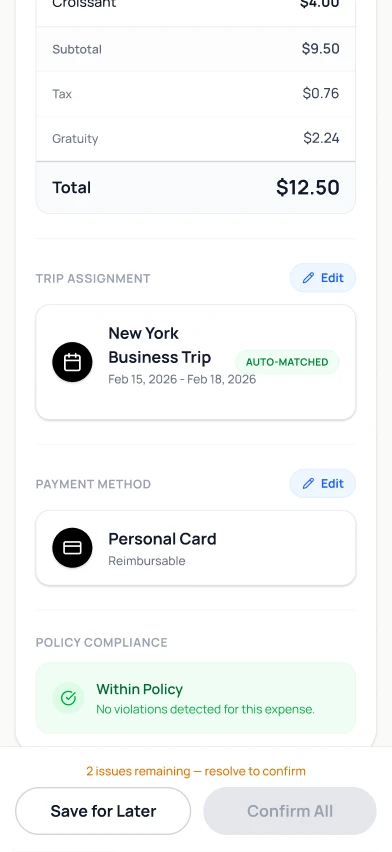
The system flagged receipts as AUTO-MATCHED, but the interface still made the user open the tab and check the OCR, the trip and the payment method by hand.
3
No macro view
There was no quick way to see the final report amount, or to clear the clean receipts in one go.
Exploring the strategic approaches
We explored three strategic approaches to the interface bottleneck, and weighed each one against what it cost the user and the roadmap.
Approach 1
The band-aid
Iterate the tabs
Didn’t solve it
The idea
Keep the one-by-one tabbed flow, but make it easier to scan: better colour coding, confidence tags and clearer typography.
Why it failed
It doesn’t touch the interaction cost. The user still clicks through 20 tabs, however pretty they look, and the automation stays hidden.
Approach 2
The big bang
Migrate to card-first
Blocked
The idea
Pause the UI redesign and rebuild the backend to issue native virtual cards, like Brex, with instant push notifications for receipts.
Why it failed
Technical and regulatory roadblocks. Tax tagging at the point of sale and API partnerships would push the timeline out by 6+ months.
Approach 3
The smart aggregator
Keep Astrada, change the frontend
The winner
The idea
Shift from tabs to a batch table.
Progressive disclosure, so users watch the system match receipts in real time and trust it.
Auto-archive the clean receipts and surface only the exceptions.
An AI chat layer for the 10% of edge cases that need human context.
Why it won
It gives the zero-touch feeling of a card-first ecosystem on our existing aggregator stack, and solves the bottleneck now, without waiting on backend partnerships.
The decision
We kept the aggregator backend and changed the interaction model. A batch table with progressive disclosure gives users the benefits of a card-first system without the engineering overhead. The card stays the north star for Phase 2.
Breaking the review surface down
With the strategy settled, we took the finished review screen apart. Each piece got one verdict: keep it, iterate it, or build it new. Then we explored each one.
Review receipts
We checked 5 receipts against your trip, your card and Acme’s policy.
Total $371.45
2 Cleared · $57.70 · approved automatically
3 Flagged · $313.75 · need you
B
All 5Cleared 2Needs you 3
A
Hilton Hotel
Feb 15–18 • Lodging
$250.00
WeWork Day Pass
Feb 17 • Workspace
$38.75
Uber
Feb 17 • Transport
$25.00
Pret A Manger
Feb 16 • Meals
$18.75
Wagamama
Feb 15 • Meals
$38.95
C
Review 3 flagged receipts
2 cleared automatically · view
D
A
Segmented filter
Copy only
Iterate
B
Batch summary card
Add a framing line
Iterate
C
Receipt rows
Density and scale rules
Iterate
D
Forward action
A state-aware label
Iterate
E
Edit sheet
Keep the structure, iterate the defaults
Keep
F
Voice layer
A new atom, from the AI avatar screen
New
Hilton Hotel
Feb 15–18 • Lodging
$250.00
DetailsTripPaymentPolicy
$50 over the nightly lodging limit. Add a note or split.
Say why in one sentence…
Save changes
E
Hilton Hotel · $250.00
$50 over the lodging limit
Say whyRemove
F
Removed from v1
Thumbnail strip
Duplicated warnings
Vanity compliance score
Per-field sheets
Working with content
The words changed as much as the layout. Every message now says what is wrong and what to do about it.
Previous
Newly designed
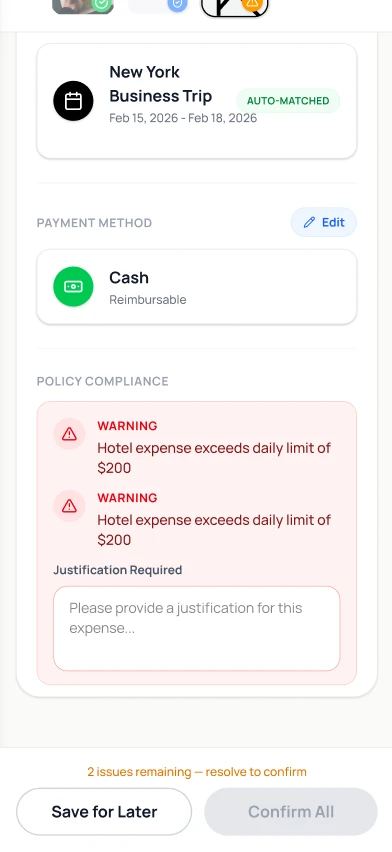
WARNING: Hotel expense exceeds daily limit of $200 (×2)
POLICY · “$50 over the nightly lodging limit. Add a note or split.”
“Please provide a justification for this expense…”
“Say why in one sentence. Type it or speak it.”
“2 issues remaining — resolve to confirm”
“Needs you 3” and a button: “Review 3 flagged receipts”
Unnamed thumbnail tabs
Named rows: merchant, then date • category
Previous
WARNING: Hotel expense exceeds daily limit of $200 (×2)
Newly designed
POLICY · “$50 over the nightly lodging limit. Add a note or split.”
Previous
“Please provide a justification for this expense…”
Newly designed
“Say why in one sentence. Type it or speak it.”
Previous
“2 issues remaining — resolve to confirm”
Newly designed
“Needs you 3” and a button: “Review 3 flagged receipts”
Previous
Unnamed thumbnail tabs
Newly designed
Named rows: merchant, then date • category
The sheet’s tabs are the content categories:DetailsTripPaymentPolicy
Exploring the atoms
Each atom was drawn as several real screens. Every variant is captioned with what it optimises and what it costs, and the chosen one is ringed in green.
Atom 1
The batch summary and the mental model
The first thing users see decides whether this is a to-do list or a supervisor’s dashboard.
V1 · Receipts first
All 5Cleared 2Needs you 3
Hilton Hotel
Feb 15–18 • Lodging
$250.00
WeWork Day Pass
Feb 17 • Workspace
$38.75
Optimises: Vertical space.Costs: State has to be inferred row by row, so the mental model is “chores”.
V2 · Total only
Total $371.45
All 5Cleared 2Needs you 3
Hilton Hotel
Feb 15–18 • Lodging
$250.00
Optimises: A money anchor.Costs: Hides the split, and gives no proof the system worked.
V3 · State-split card
Chosen
We checked 5 receipts against your trip, your card and Acme’s policy.
Total $371.45
2 Cleared · $57.70 · approved automatically
3 Flagged · $313.75 · need you
All 5Cleared 2Needs you 3
Costs: About 120pt of height.
V4 · Progress ring
3 of 5need you
All 5Cleared 2Needs you 3
Hilton Hotel
Feb 15–18 • Lodging
$250.00
Optimises: A glanceable ratio.Costs: Reads as loading, and finance thinks in money, not percentages.
It answers “where do I stand?” in under two seconds.
The framing line voices the system’s work, which builds trust.
Money per state sets up the split call to action.
Chosen for impact because it answers “where do I stand?” before anything else.
Atom 2
Filter tabs: the copy
The structure is fixed. What we explored is what the tabs say.
V1 · Current
All 5Ready 2Not Ready 3
Pret A Manger
Feb 16 • Meals
$18.75
Optimises: Familiar status words.Costs: “Ready” and “Not Ready” say nothing about who acts next.
V2 · Cleared / Needs you
Chosen
All 5Cleared 2Needs you 3
Hilton Hotel
Feb 15–18 • Lodging
$250.00
Optimises: Verbs that match the pipeline and the voice script.
V3 · Taxonomy
AllTripPaymentPolicy
Hilton Hotel
Feb 15–18 • Lodging
$250.00
Optimises: Grouping by policy area.Costs: Users think in receipts, not taxonomies, and the counts fragment.
V4 · Question
All 5Done 2To fix 3
Hilton Hotel
Feb 15–18 • Lodging
$250.00
Optimises: Plain language.Costs: “Done” is ambiguous next to “submitted”.
The verbs match the pipeline and the voice script.
“Needs you” assigns ownership.
Counts answer “how many need me?”, and red dots on the sheet tabs localise each receipt’s issues.
44pt segmented control · white pill on #ECECE9 · counts in tabular-nums
Chosen for impact because the labels say who owns the next move.
Atom 3
The receipt row: density and scale
V1 · Full row, 96pt
Hilton Hotel
Feb 15–18 • Lodging
New York Business Trip
$250.00
WeWork Day Pass
Feb 17 • Workspace
New York Business Trip
$38.75
Optimises: The trip name on every row.Costs: Four rows per screen, so 15 receipts is four scrolls.
V2 · Compact row, 72pt
Chosen
Hilton Hotel
Feb 15–18 • Lodging
$250.00
WeWork Day Pass
Feb 17 • Workspace
$38.75
Uber
Feb 17 • Transport
$25.00
Optimises: About 5.5 rows per screen.
V3 · Two-column grid
Hilton Hotel
$250.00
WeWork Day Pass
$38.75
Uber
$25.00
Pret A Manger
$18.75
Optimises: More receipts per screen.Costs: Amounts don’t align, and the scan path zig-zags.
V4 · State-grouped sections
Needs you (3)
Hilton Hotel
Feb 15–18 • Lodging
$250.00
WeWork Day Pass
Feb 17 • Workspace
$38.75
Cleared (2)
Pret A Manger
Feb 16 • Meals
$18.75
Optimises: Separates the work from the proof.Costs: Duplicates the tabs and kills chronology. We kept the idea for the AI-native queue.
Scale rules at 10 to 15 receipts
Rows stay at a fixed 72pt, with no wrapping.
The trip name lives in the sheet only.
After row 8, a sticky mini-bar appears on scroll.
In “Needs you”, cleared rows collapse into one summary row.
3 need you · $313.75Jump
2 cleared · $57.70 ▸
Who, what kind, how much and what state, all in one glance.
Amounts align vertically, which makes them comparable.
Chosen for impact because one glance gives who, what kind, how much and what state.
Atom 4
The edit surface
V1 · Tabbed sheet (the base)
Hilton Hotel
Feb 15–18 • Lodging
$250.00
DetailsTripPaymentPolicy
$50 over the nightly lodging limit. Add a note or split.
Say why in one sentence…
Save changes
Optimises: One surface, with issues marked by dots.Costs: It opens on the first tab, even if the problem is elsewhere.
V2 · Single-scroll sheet
Details
Trip
Payment
Policy
…and it keeps going
Optimises: Everything in one place, issue sections highlighted.Costs: A long scroll, and the issues aren’t quantified.
V3 · Wizard
Step 1 of 3 · Policy
$50 over the nightly lodging limit.
Next
Optimises: Issues come first.Costs: A linear path is the old tab nightmare in new clothes.
V4 · Inline expand
Hilton Hotel
Feb 15–18 • Lodging
$250.00
$50 over the nightly lodging limit.
Say why…
Keyboard covers the list
Optimises: No sheet to open.Costs: The list jumps, the keyboard covers it, and the pinned context is lost.
Final · V1 with three tweaks
Chosen
Hilton Hotel
Feb 15–18 • Lodging
$250.00
DetailsTrip1Payment1Policy2
$50 over the nightly lodging limit. Add a note or split.
Say why in one sentence…
Save & next flag · 1 of 3
1. It opens on the first tab with a dot.
2. Dots become count badges when there is more than one issue.
3. The button becomes “Save & next flag” inside the flagged queue.
One surface, four rooms.
It lands on the problem, not on the first field.
A queue-aware button chains one resolution into the next.
Top radius 20 · grabber 36×4 · header 64 · tab bar 44 · fields 48 with 12 radius
Chosen for impact because it lands on the problem and chains one fix into the next.
Atom 5
The forward action
V1 · Static
Review 3 flagged receipts
2 cleared automatically · view
Optimises: Simplicity.Costs: It never changes, so it never rewards.
V2 · Dual call to action
Proceed with 2 cleared
Resolve 3
Optimises: Both outcomes are on screen.Costs: Two primaries compete for the thumb.
V3 · Gated submit
Submit report
Resolve 3 flagged receipts to continue
Optimises: Nothing goes in until it’s clean.Costs: The locked button, and its anxiety, come back.
V4 · State-aware morph
Chosen
Review 3 flagged receipts
2 cleared automatically · view
↓ at zero flags
Submit report · $371.45
2 cleared automatically · view
One primary action at a time.
The label quantifies the work left.
The morph is the reward, and the ghost line keeps the proof in sight.
56pt full-width pill · ghost line 13/18, centred, with a link
Chosen for impact because the button always says the one thing to do next.
Atom 6
The voice layer
A screen can show many things at once. A voice can say only one, so the card under the avatar is the violation, not a flight.
V1 · Avatar, card and chips
SpeakerMuteMinimiseClose
Hilton Hotel · $250.00
$50 over the nightly lodging limit
Say whyRemove
Optimises: Everything on screen at once.Costs: The transcript is hidden, and the large avatar dominates.
V2 · Avatar and live transcript
First: Hilton, $50 over the lodging limit.
Client dinner, Acme deal.
Hilton Hotel · $250.00
$50 over the nightly lodging limit
Say whyRemove
Optimises: Nothing is missed.Costs: Reading and listening compete, so it isn’t eyes-free.
V3 · Audio-first, the card as an echo
Chosen
Hilton Hotel · $250.00
$50 over the lodging limit
Say whyRemove
Idle: the avatar fades to a small orb and waits.
The voice script
1
Greeting. A short hello.
2
The batch. “5 scanned, 2 cleared, 3 need you.”
3
For each flag. State the violation, listen, confirm, then “next”.
4
Closure. “All set. 5 submitted, $371.45.”
Everything is actionable by voice.
The card mirrors the speech for glances.
Two chips at most, and mute and minimise for office settings.
Chosen for impact because everything is actionable by voice, with the card only echoing it.
Exploring the whole screen
Before the atoms went together, we tried four basic structures for the whole screen, each as a real screen at the same width.
Structure 1 · The Excel table
Review receipts
Receipt
Date
Category
Trip
Payment
Policy
Amount
Hilton Ho
Feb 15
Lodging
NYC
Card
Over
$250.00
WeWork Da
Feb 17
Workspa
NYC
Card
Over
$38.75
Uber
Feb 17
Transpo
NYC
Card
Over
$25.00
Pret A Ma
Feb 16
Meals
NYC
Card
OK
$18.75
Wagamama
Feb 15
Meals
NYC
Card
OK
$38.95
Optimises: Everything visible at once.Costs: A 390px screen can’t hold seven columns, and you can’t act from a cell.
Structure 2 · The accordion
Review receipts
Hilton Hotel
Feb 15–18 • Lodging
$250.00
WeWork Day Pass
Feb 17 • Workspace
$38.75
Uber · $25.00
Trip
Payment
Policy
Note
Save
Pret A Manger
Feb 16 • Meals
$18.75
Wagamama
Feb 15 • Meals
$38.95
Optimises: Depth without leaving the list.Costs: Every peek costs two taps, and the batch disappears off screen.
Structure 3 · Quick-action rows
Review receipts
Hilton Hotel
$250.00
WeWork Day Pass
$38.75
Uber
$25.00
Pret A Manger
$18.75
Wagamama
$38.95
Optimises: Speed for the clean majority.Costs: It approves sight unseen, which trains blind trust, risks mis-taps, and flags still need depth.
Structure 4 · Problem-first inline
Needs you
2 cleared · hidden
Hilton Hotel$250.00
Say why…
WeWork Day Pass$38.75
Say why…
Uber$25.00
Say why…
Optimises: Focus on the exceptions.Costs: It erases proof the system worked, and users ask where the rest went. We reused it for the AI-native queue.
Review receipts
We checked 5 receipts against your trip, your card and Acme’s policy.
Total $371.45
2 Cleared · $57.70 · approved automatically
3 Flagged · $313.75 · need you
All 5Cleared 2Needs you 3
Hilton Hotel
Feb 15–18 • Lodging
$250.00
WeWork Day Pass
Feb 17 • Workspace
$38.75
Uber
Feb 17 • Transport
$25.00
Pret A Manger
Feb 16 • Meals
$18.75
Wagamama
Feb 15 • Meals
$38.95
Review 3 flagged receipts
2 cleared automatically · view
Chosen
Summary, segmented states, a scannable list and a single sheet
A macro summary answers “where do I stand?” in one glance: the total, and the money split into Cleared $57.70 and Flagged $313.75.
All / Cleared / Needs you focuses attention without hiding the batch, which closes the trust gap in structure 4.
One-line rows respect the mobile width: merchant and amount above the fold, category as a scannable second line.
All depth lives in one bottom sheet, with a pinned receipt header to keep context.
The forward action is state-aware, and a sticky mini-bar keeps the flags in sight at scale.
How they compare
Scan time at 15 receiptsTaps to resolve 3 flagsProof the system worked is visibleVoice parity
The Excel table
Scan time at 15 receiptsWeak
Taps to resolve 3 flagsWeak
Proof the system worked is visibleStrong
Voice parityWeak
The accordion
Scan time at 15 receiptsPartial
Taps to resolve 3 flagsWeak
Proof the system worked is visiblePartial
Voice parityPartial
Quick-action rows
Scan time at 15 receiptsStrong
Taps to resolve 3 flagsPartial
Proof the system worked is visiblePartial
Voice parityPartial
Problem-first inline
Scan time at 15 receiptsStrong
Taps to resolve 3 flagsStrong
Proof the system worked is visibleWeak
Voice parityStrong
Final: summary, list and sheet
Scan time at 15 receiptsStrong
Taps to resolve 3 flagsStrong
Proof the system worked is visibleStrong
Voice parityStrong
A design judgement from walking each structure through the same fifteen receipts, not measured data. Problem-first wins on focus, which is why we reused it as the AI-native queue.
Solution
The decided design
The decided model: an exception-first batch review where the pipeline’s work is visible, cleared receipts approve themselves, and humans touch only flags, entered through a list, a table, or a conversation.
The molecule, recapped
Review receipts
We checked 5 receipts against your trip, your card and Acme’s policy.
Total $371.45
2 Cleared · $57.70 · approved automatically
3 Flagged · $313.75 · need you
B
All 5Cleared 2Needs you 3
A
Hilton Hotel
Feb 15–18 • Lodging
$250.00
WeWork Day Pass
Feb 17 • Workspace
$38.75
Uber
Feb 17 • Transport
$25.00
Pret A Manger
Feb 16 • Meals
$18.75
Wagamama
Feb 15 • Meals
$38.95
C
Review 3 flagged receipts
2 cleared automatically · view
D
A
Segmented filter. All, Cleared and Needs you: attention without hiding the batch.
B
Batch summary. Where do I stand, in under two seconds.
C
Receipt rows. Who, what kind, how much and what state.
D
Forward action. One primary action, always the next one.
E
Edit sheet. One sheet, four rooms, opening on the problem.
F
Voice layer. The same queue, spoken.
Mobile: travellers
A clean list. Tapping a receipt opens a bottom sheet with the OCR data, the trip match and the policy status, so a justification takes seconds.
Review receipts
We checked 5 receipts against your trip, your card and Acme’s policy.
Total $371.45
2 Cleared · $57.70 · approved automatically
3 Flagged · $313.75 · need you
1
All 5Cleared 2Needs you 3
Hilton Hotel
Feb 15–18 • Lodging
$250.00
WeWork Day Pass
Feb 17 • Workspace
$38.75
Uber
Feb 17 • Transport
$25.00
Pret A Manger
Feb 16 • Meals
$18.75
Wagamama
Feb 15 • Meals
$38.95
Review 3 flagged receipts
2 cleared automatically · view
Hilton Hotel
Hilton Hotel
Feb 15–18 • Lodging
$250.00
DetailsTrip1Payment1Policy2
$50 over the nightly lodging limit. Add a note or split.
Say why in one sentence…
Save & next flag · 1 of 3
23
1
The summary sets the mental model: the system has done the work, and you supervise.
2
Dots on the tabs show where the issues are, without opening each one.
3
“Save & next flag” chains one fix into the next.
Web: finance and admins
A dense table where out-of-policy flags are resolved inline with dropdowns.
Expense review · New York Business Trip
3 flagged · 2 cleared
Approve 2 cleared · $57.70
Receipt
Traveller
Amount
Resolve
Hilton Hotel
A. Rao
$250.00
Choose▾
WeWork Day Pass
A. Rao
$38.75
Choose▾
Uber
M. Chen
$25.00
Choose▾
Pret A Manger
M. Chen
$18.75
Auto-approved
Wagamama
J. Okafor
$38.95
Auto-approved
Ten flags, zero sheets.
Finance resolves each flag in its row, with a dropdown, and approves the cleared receipts in one action.
The AI-native flow
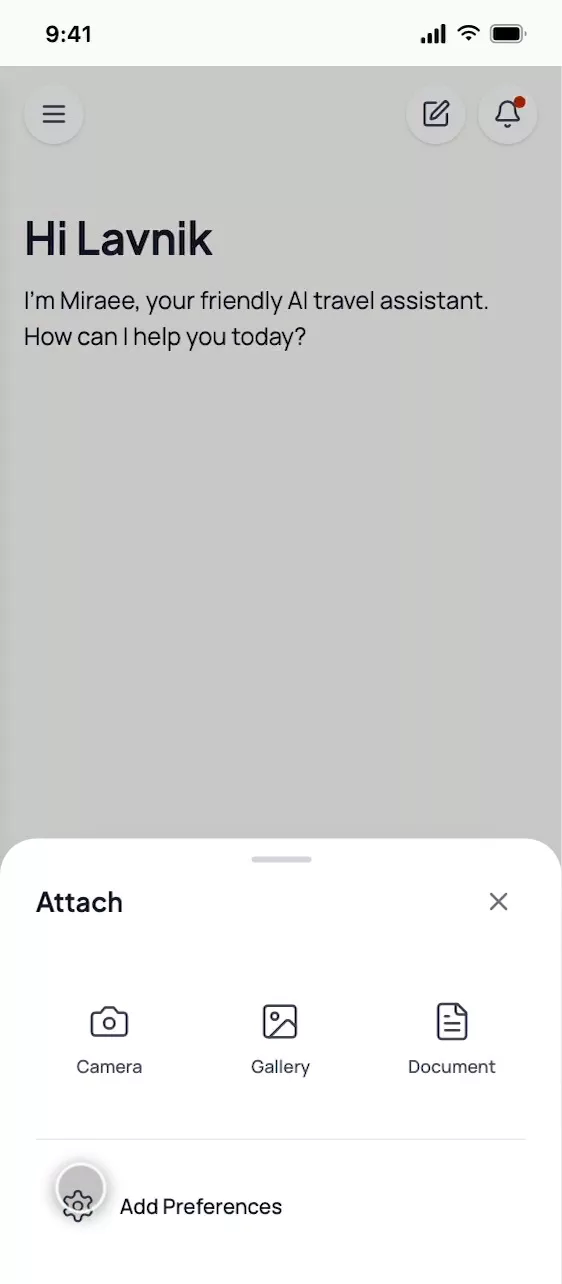
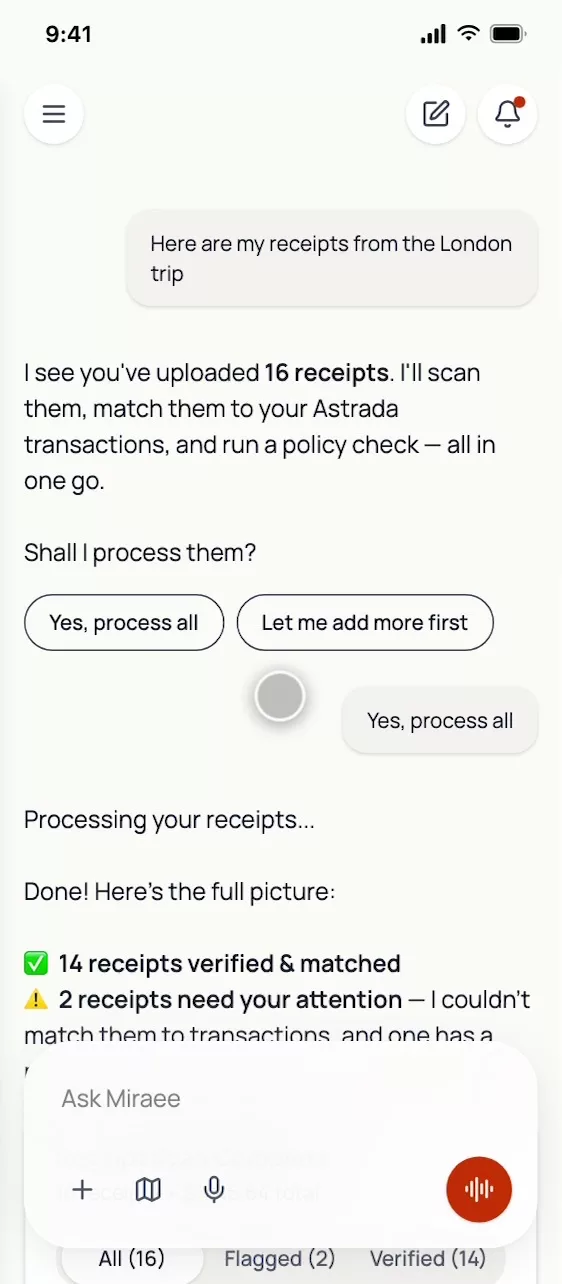
To test the hypothesis that filing should feel like talking to an assistant, we built a headless conversational interface. Travellers drop receipts and let the AI sort them. Voice-to-text (through Wispr) and a digital avatar let them literally speak a justification — "this dinner was with the client, John Doe, which is why it's over the $50 limit."
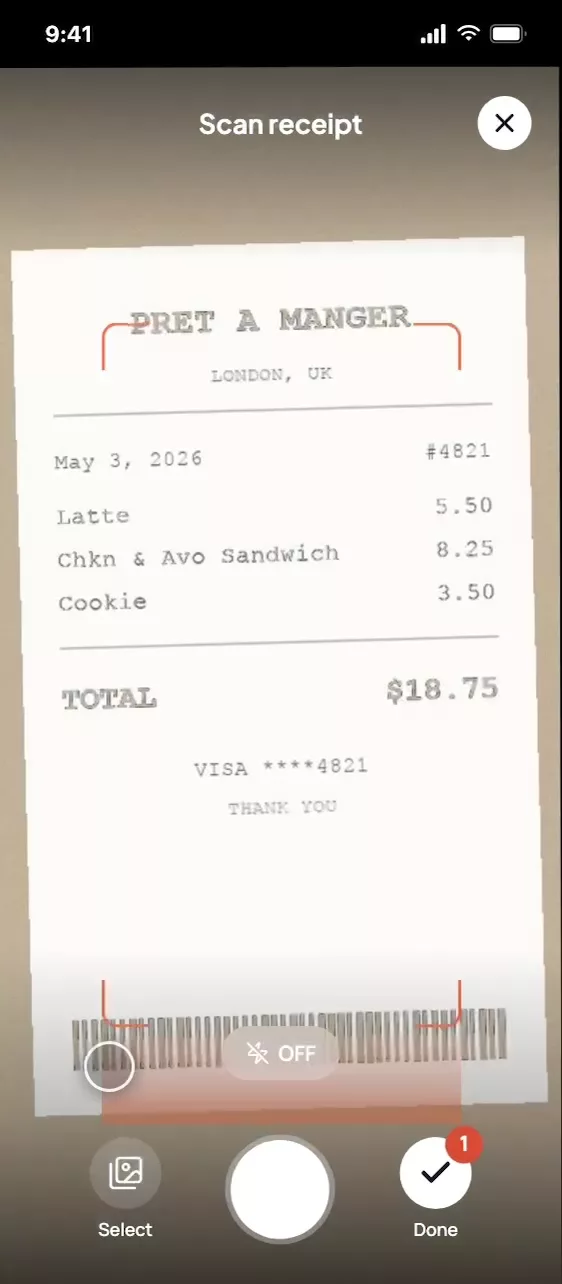
One entry point for camera, gallery or a document.
Receipt capture, with the amount picked out live.
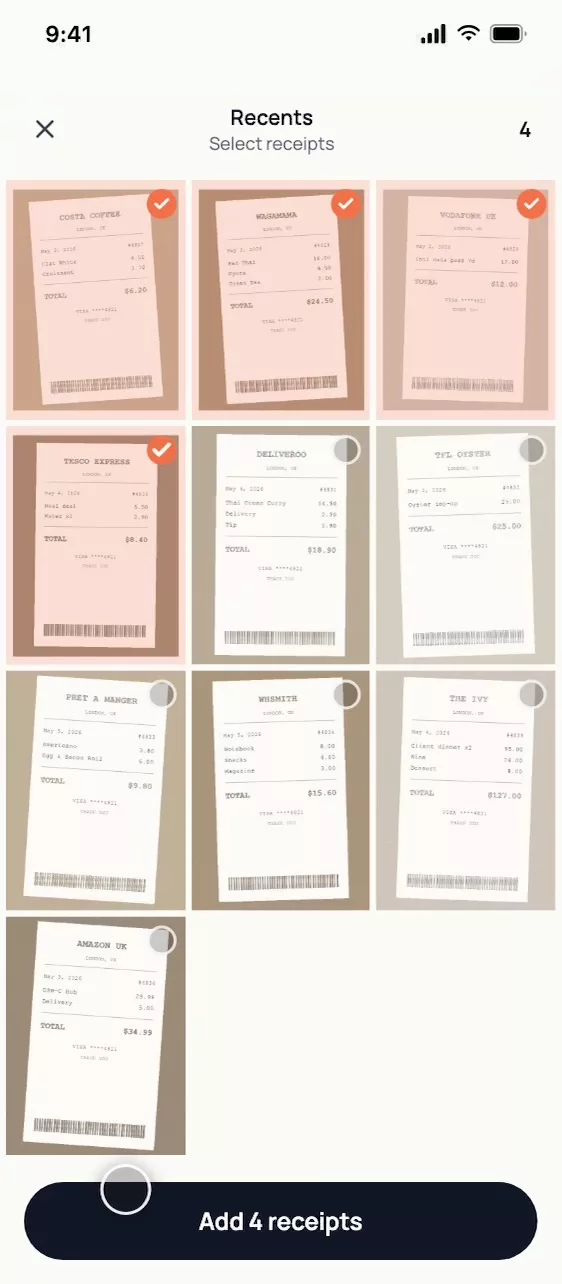
Batch-select what you already photographed.
Hilton Hotel · $250.00
$50 over the lodging limit
Say whyRemove
The avatar, and a policy-violation card in place of the flight card.
1 of 3
Hilton Hotel$250.00
$50 over the lodging limit
2 cleared · hidden
Queue mode: one flag at a time, with the cleared receipts behind a chip.
Idle: the avatar fades to a small orb and waits.
Idle: the avatar fades to a small orb until it is listening.
The script, in one line: “5 scanned, 2 cleared, 3 need you. First: Hilton, $50 over the lodging limit.”
The sync, on screen
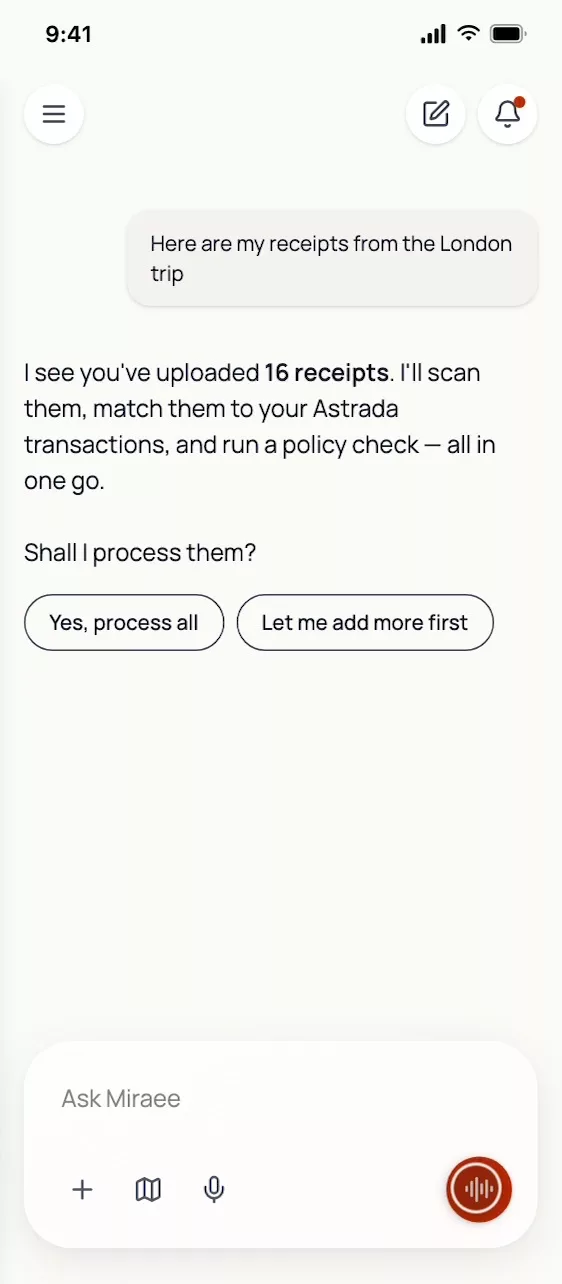
The assistant proposes the whole job: scan, match, policy check, in one go.
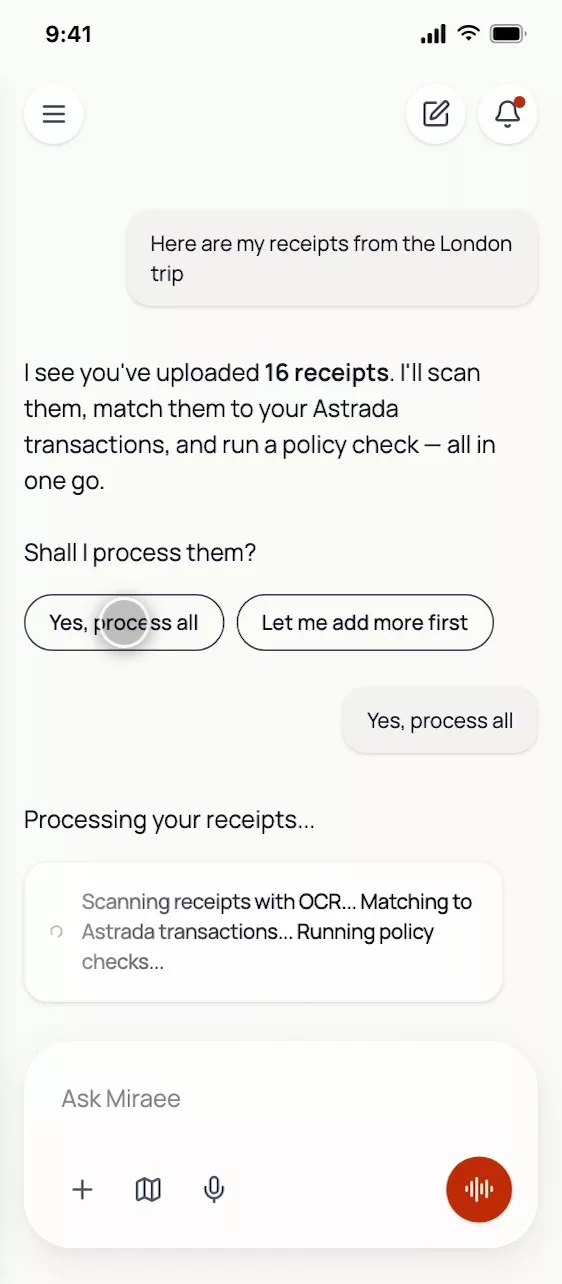
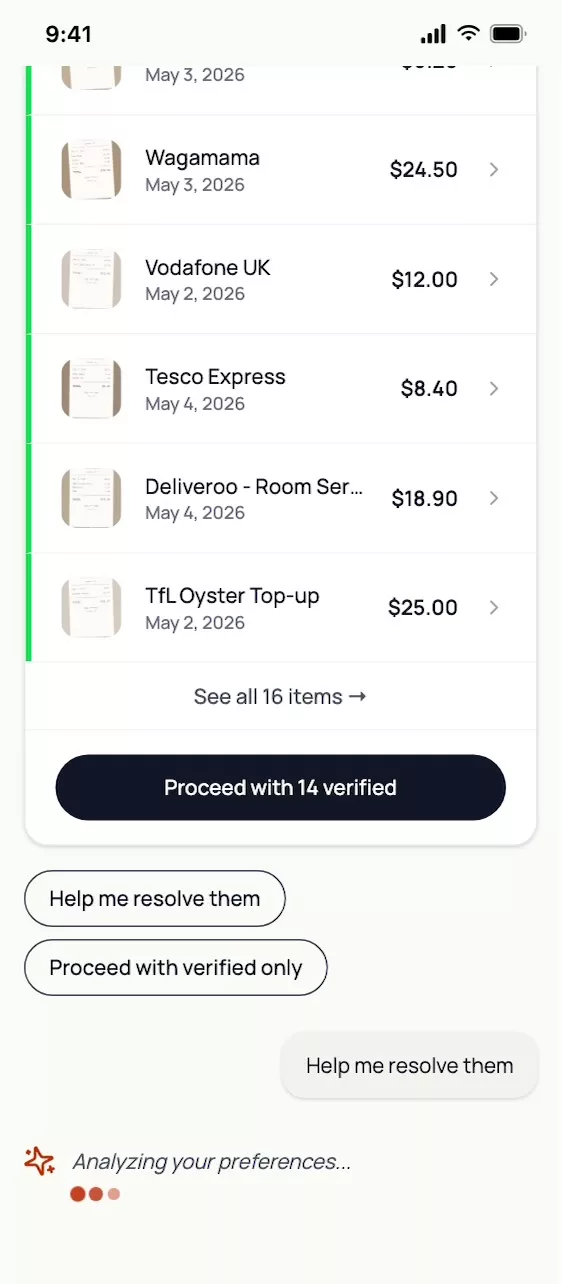
Each stage surfaces as it runs — OCR, transaction matching, policy checks.
The full picture: 14 verified and matched, 2 that need attention.
The auto-approval rule
The pipeline clears it+It is within policy=Approved, with no human
Managers are pulled in only for exceptions, which is where the hours of review time go.
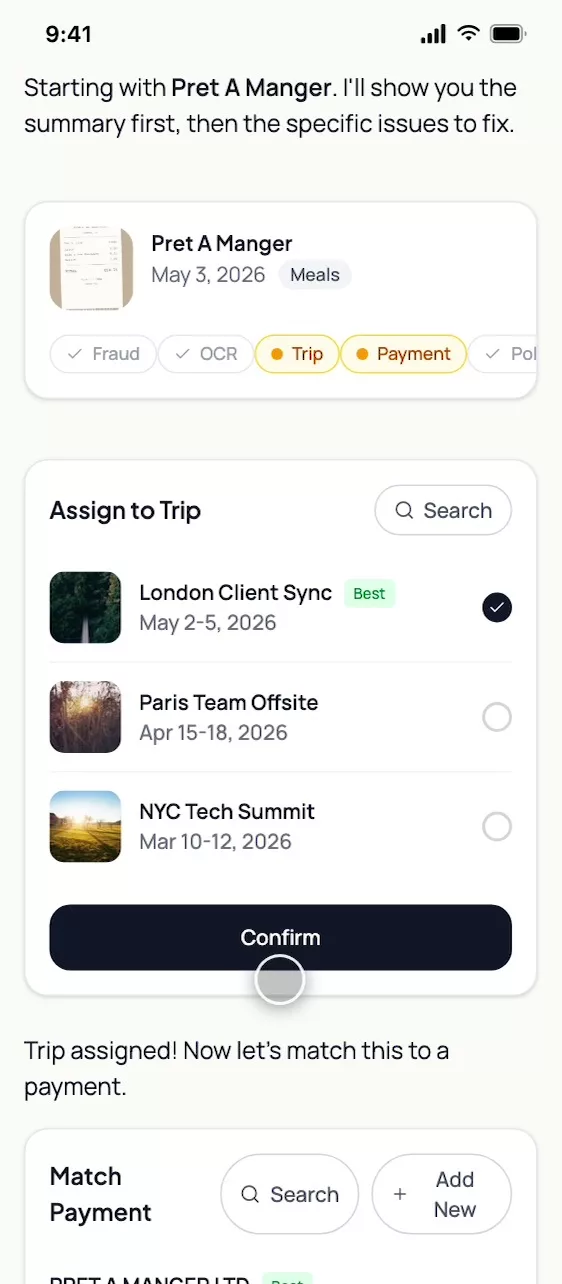
Proceed with the 14 that cleared, or resolve the two that did not.
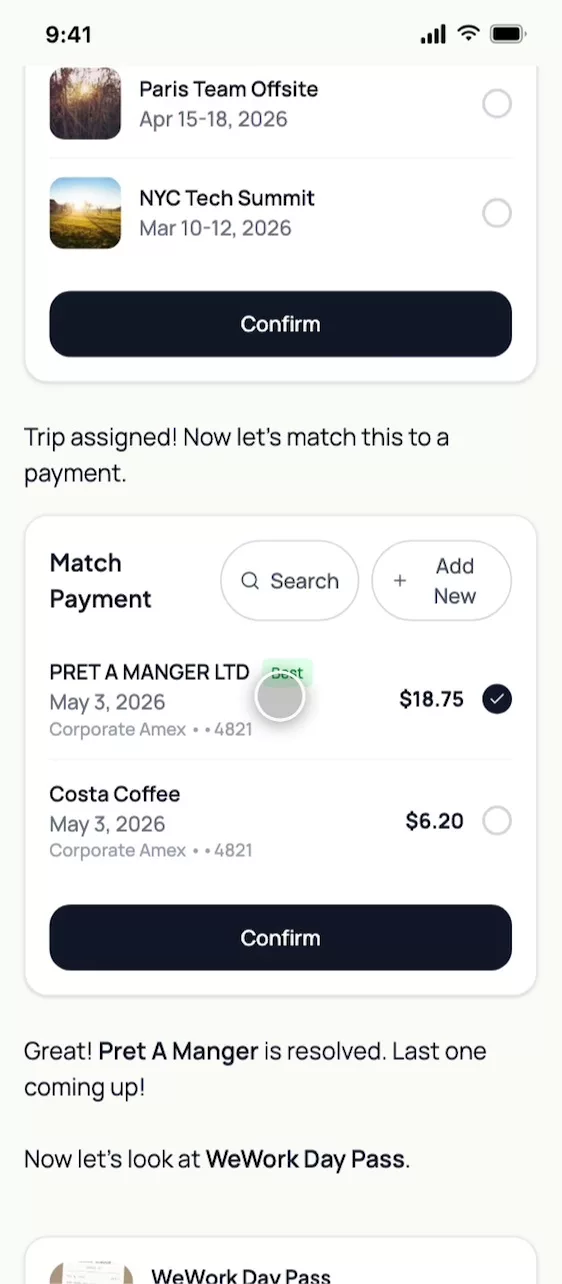
One receipt, one problem at a time: assign it to a trip.
Then match it to the card transaction the aggregator already pulled.
Scope note: because of the tax and legal liabilities involved, the payout and reimbursement module was deliberately left out of this phase. The work covers capture, validation and approval routing.
Closing the loop on the finance side
Context promised two things: speed for travellers, and defensible numbers for finance. Capture and approval deliver the first. These three flows deliver the second.
GL mapping
Approved expenses map automatically to GL codes, ready to export to NetSuite, Xero or Sage.
Approved report→
GL codes→
NetSuite · Xero · Sage
Why: Finance’s numbers land where finance lives.
Compliance scores
Every user carries a score. A consistently low one flags their future reports to managers and can reduce their future per-diem limits.
Per-user score→
Chronic lows flag reports→
Per-diem can tighten
Why: It is a behaviour feedback loop, not a punishment. The score is visible to the user, which is what removed the anxiety.
SLAs and escalation
Automated 30-day submission reminders, with escalation from manager to travel coordinator to finance.
30-day reminder→
Manager→
Travel coordinator→
Finance
Why: The email loop dies when deadlines have owners.
Testing with users
The pilot cohort, in the coded prototype
We took the decided design to the pilot cohort. Four things worked as intended. Four did not, and each became a change.
How we tested
Who
The pilot cohort: travellers from the internal pilot, our finance stakeholders and a manager.
Where
In the coded prototype, not Figma. Latency states and voice input can’t be tested in static frames, so testing happened in the coded prototype with real receipt data.
Tasks
T1File a five-receipt trip with three flags, on mobile.
T2Repeat it hands-free, by voice.
T3As finance, resolve a ten-flag queue on the web.
Measured
Time to file
Taps
Task success
Comprehension, such as “what does Cleared mean?”
The in-app satisfaction rating after an upload
What they said
Review receipts
We checked 5 receipts against your trip, your card and Acme’s policy.
Total $371.45
2 Cleared · $57.70 · approved automatically
3 Flagged · $313.75 · need you
1
5 receipts checked
Fraud detection
OCR validation
Trip matching
Transaction matching
Policy check
2
All 5Cleared 2Needs you 3
46
Hilton Hotel
Feb 15–18 • Lodging
$250.00
5
Pret A Manger
Feb 16 • Meals
$18.75
Say why: “Hilton Hotel, $250.00, $50 over the limit.”
73
What worked
1
“Dropped them and walked away. The summary told me it was handled.”
2
“The checklist filling step by step proved it wasn’t just spinning.”
3
“Speaking the justification beat typing it on the metro.”
4
“I finally saw what passed, so I stopped double-checking.”
What we changed
5
“The red rail felt like failure, even for warnings.”
Tweak: A warning gets an amber rail. An error gets a red one.
6
“Let me peek at what “Ready” contains before I trust it.”
Tweak: The Cleared tab lists the receipts that passed.
7
“The avatar staring at me was uncanny.”
Tweak: The avatar stays dormant until it is listening.
8
“Finance: ten flags shouldn’t mean ten sheets.”
Tweak: On the web table, flags resolve inline.
Web, finance
What we changed
What they said
What we changed
Atom touched
“The red rail felt like failure, even for warnings.”
Warnings went amber. Errors stay red.
The receipt row
“Let me peek at what “Ready” contains before I trust it.”
The Cleared tab lists the receipts that passed.
The filter tabs
“The avatar staring at me was uncanny.”
The avatar stays a dormant orb until it is listening.
The voice layer
“Finance: ten flags shouldn’t mean ten sheets.”
On the web, flags resolve inline in the table.
The edit surface
“The red rail felt like failure, even for warnings.”
Warnings went amber. Errors stay red.
The receipt row
“Let me peek at what “Ready” contains before I trust it.”
The Cleared tab lists the receipts that passed.
The filter tabs
“The avatar staring at me was uncanny.”
The avatar stays a dormant orb until it is listening.
The voice layer
“Finance: ten flags shouldn’t mean ten sheets.”
On the web, flags resolve inline in the table.
The edit surface
Edge cases
Situations a single rigid flow could not serve
Real expenses are untidy: foreign currency, a hotel bill with a minibar on it, a receipt left on a train. Each needed its own small piece of interface.
1
Multi-currency
Izakaya Tanuki
Receipt · Tokyo
¥6,200
OCR: ≈ $41.80 @ trip-date rate 148.33
Card feed
Matched to the receipt
$41.80 Matched
Meals limit $50: in policy
A receipt in yen is converted at the trip-date rate: ¥6,200 becomes $41.80. The rate shows on the receipt side and on the transaction side, so a reviewer can see that both agree.
2
Itemised receipts
Hilton Hotel
$250
Room$230 In policy
Minibar wine$20 Alcohol
Approve $230
Justify $20
The $250 Hilton bill splits into a $230 room, in policy, and a $20 minibar charge, flagged. Policy runs per line, so the traveller approves the room and justifies only the wine.
3
A lost receipt
No receipt? Declare it.
Amount$41.80
MerchantIzakaya Tanuki
ReasonLost it on the train▾
Sign here
Affidavit #A-2291 attached
A guided affidavit with an e-signature replaces the free-text note. It leaves an auditable record that finance can stand behind.
4
Receipt-optional companies
Acme Corp: no receipts under $75. Matched from the card feed.
Black Sheep Coffee
No receipt needed
$6.40
Uber
No receipt needed
$25.00
Pret A Manger
No receipt needed
$18.75
Where a company waives receipts under a threshold, matching runs on the Astrada feed alone. Rows carry a “No receipt needed” chip instead of a missing-receipt flag.
5
Voice in the wild
AssistantI heard “client dinner with John Doe”. Yes or no?
YesNo, say it again
Yes.
Justification attached
A mishear is the voice flow’s worst case. The assistant reads back what it heard and asks yes or no before anything is attached to the expense.
Final design
The decided design, in four frames
We checked 5 receipts against your trip, your card and Acme’s policy.
Total $371.45
2 Cleared · $57.70 · approved automatically
3 Flagged · $313.75 · need you
All 5Cleared 2Needs you 3
Hilton Hotel
Feb 15–18 • Lodging
$250.00
WeWork Day Pass
Feb 17 • Workspace
$38.75
Pret A Manger
Feb 16 • Meals
$18.75
Review 3 flagged receipts
2 cleared automatically · view
Proves: the batch summary, the filter and the receipt row.
Hilton Hotel
Feb 15–18 • Lodging
$250.00
DetailsTrip1Payment1Policy2
$50 over the nightly lodging limit. Add a note or split.
Say why in one sentence…
Save & next flag · 1 of 3
Proves: the edit surface.
Expense review · New York Business Trip
3 flagged
Approve 2 cleared · $57.70
Receipt
Amount
Resolve
Hilton Hotel
$250.00
Choose▾
WeWork Day Pass
$38.75
Choose▾
Uber
$25.00
Choose▾
Pret A Manger
$18.75
Auto-approved
Proves: the forward action, at finance’s scale.
Hilton Hotel · $250.00
$50 over the lodging limit
Say whyRemove
Idle: the avatar fades to a small orb and waits.
Proves: the voice layer.
The prototype
A coded prototype, built with Cursor and Claude Code, with real-format data, live latency states and voice input: the states Figma couldn’t hold.
Impact
Measured against the baseline, and the pilot
This was a one-week sprint to an MVP followed by an internal pilot, so impact is measured through baseline comparisons and adoption signals rather than a long-run production dataset.
~90 min → under 4
Average time to create an expense report, from the spreadsheet era to the AI-aggregator flow
80%
Estimated reduction in the time managers spend reviewing standard travel receipts
Before (v1)→After
Creating a report
~12 min→Under 4 min
Review
100% manual→Exceptions only (−80%)
Turnaround
4–6 days→Same day, if in policy
Auto-approval
0%→~75% (pilot estimate)
For scale, the spreadsheet era took about 90 minutes to create a report.
The results: fixing the structure
We replaced the tab-by-tab flow with a scannable batch table and an exception-only model. That restored the five-minute perception without changing backend performance. A second round of testing with the new structure showed:
Time to sort and verify
Down from about 12 to 15 minutes of linear clicking to under 4 minutes of batch scanning.
A behavioural shift
In v1, travellers uploaded and then put the review off for days, put off by the tab structure. With the new batch summary, the vast majority finished the review straight after uploading, because the screen showed at once what was already cleared.
The reality check
We do not claim immediate adoption for everyone. Outliers remain: some travellers still delay filing because of travel exhaustion, time-zone changes or back-to-back trips. But in active sessions, the procrastination loop that the interface itself created was effectively broken.
Enterprise validation
The policy engine and GL mapping passed the technical requirements for onboarding enterprise clients including JP Morgan and DCW. That is the payoff of the connected flows.
Less anxiety
Pilot users singled out the compliance score and the visible, progressive AI checks for removing the fear of a rejection arriving after submission.
Leadership & reflections
What leading this actually involved
Leading through a technical blocker
When the Brex integration failed, I ran a rapid pivot workshop with the PM and the full-stack engineers. Mapping the aggregator alternative saved the core value proposition without moving the roadmap.
Changing how we prototype
Figma became too rigid and too expensive for testing multi-state conversational flows. I pushed our workflow towards coded, interactive prototypes built with AI dev tools (Cursor, Claude Code), so we could test latency states and voice input with real data far faster.
Listening past the demo
Pilot feedback changed things people could see: warnings went amber, and the avatar became a dormant orb. We shipped the feedback, not just the findings.
Translating between two audiences
Enterprise clients — CEOs and finance heads — cared about GL codes and compliance. Travellers wanted to go home. The dual-interface system exists because both were right.
In conclusion
Filing an expense used to be a chore that travellers rushed and reviewers redid. We removed the default chore and let people supervise the exceptions instead. That took product, engineering and finance stakeholders working as one team.